
Jobs Startups People Pricing
en
en English
ar العربية
de Deutsch
es Español
fr Français
it Italiano
pt Português
ru Русский
zh 官话
Sign In Get Started
Jobs
Startups
People
Pricing
Sign In
Get Started
Language
en ar de es fr it pt ru zh
Chrome extension

Your profile, in any application form
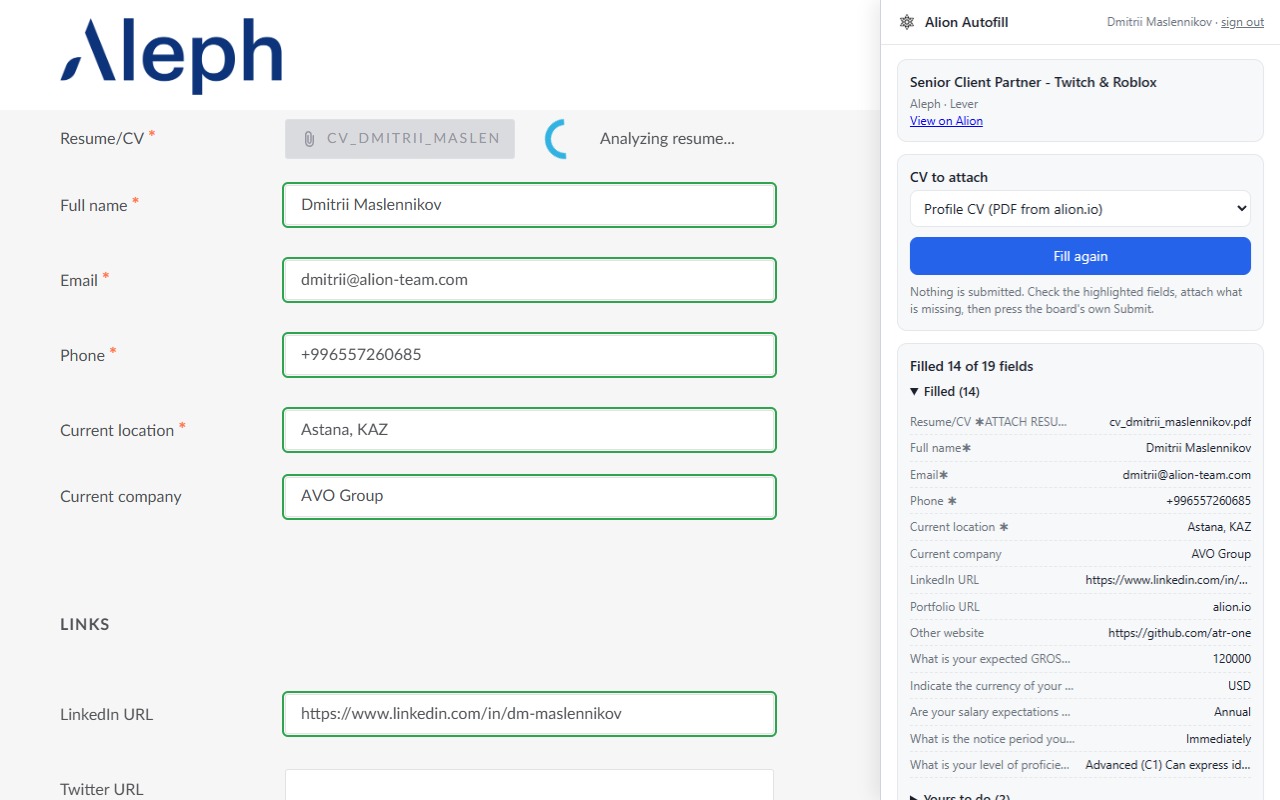
Alion Autofill fills the application form of a job posting from your Alion profile: name, contacts, location, links, work history, education, skills, salary expectation and your CV as a PDF. One click instead of fifteen minutes of copy-paste. You check every field and press Submit yourself.
Add to Chrome Free · Chrome, Edge, Brave and other Chromium browsers
Works on Greenhouse Lever Ashby Career sites that embed them
A Lever application form filled by Alion Autofill, with the side panel showing what was filled
A Lever form after one click: green outlines on the filled fields, the side panel with the report.
1
Open the Apply page
Any posting on Greenhouse, Lever or Ashby, from Alion or straight from the company's careers site. The icon lights up when a form is there.
2
Press Fill
The side panel opens and the form is filled from your profile. Filled fields are outlined green; fields that need you are outlined amber and listed.
3
Answer once, remember forever
Work authorisation, visa, notice period, the employer's own questions: answer them in the panel and the next form that asks the same thing is filled with it.
4
Check and submit
The board's own Submit button stays yours. Then mark the application as sent and it shows as applied on Alion.

What it fills

Everything your Alion profile knows, in the form each field takes it: first and last name, email, phone with the country code, city and country, LinkedIn, GitHub and portfolio links, current company and title, years of experience, work history, education, skills, languages, salary expectation, availability, work permits and citizenship. Your CV goes in as a PDF: the profile CV from alion.io, or a CV tailored to this posting, built on alion.io in about a minute.

Edit your profile once on alion.io and every form gets the update. Nothing is stored in the browser except the sign-in.
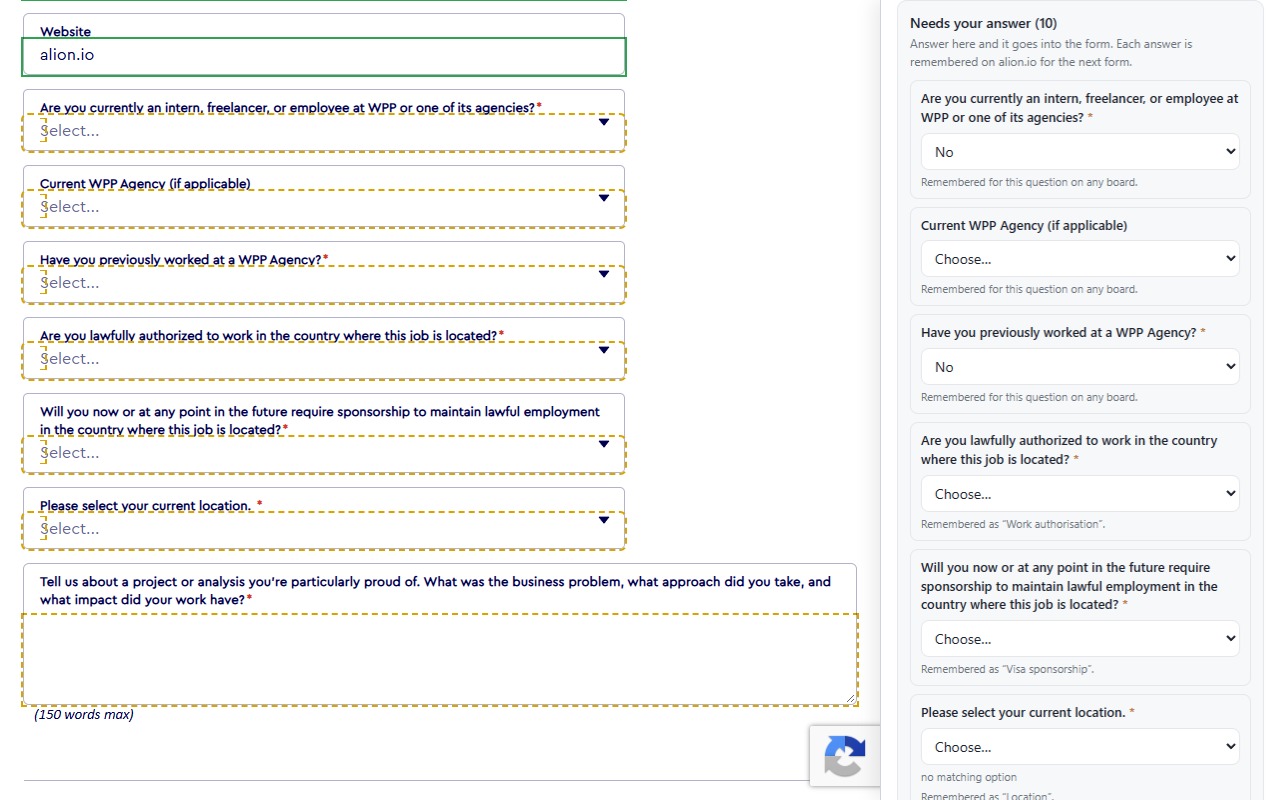
The side panel listing the questions the profile could not answer, with two answers chosen
The questions your profile does not cover, answered in the panel and remembered on alion.io.
What it never does
  • Never submits an application. You press Submit.
  • Never ticks a consent, privacy or terms checkbox.
  • Never invents an answer. A question the profile cannot answer is left for you.
  • Never reads a page you did not ask it to fill, and reads nothing until you press Fill.
  • Never sends your data anywhere except the form you opened and your own Alion account.
What it asks for
  • Access to the application pages of Greenhouse, Lever and Ashby: to find the form and write into it.
  • Access to alion.io: your profile, your CV and the record of applications you marked as sent.
  • A sign-in with your Alion account, once. Revoke it any time in Settings → Security.
  • No browsing history, no other sites, no remote code.

Boards

Greenhouse (boards.greenhouse.io, job-boards.greenhouse.io and the EU boards), Lever (jobs.lever.co) and Ashby (jobs.ashbyhq.com), including the forms companies embed on their own careers sites. The forms the extension could not fill are reported to us, so the next version does better; more boards follow.

Privacy

The extension is part of Alion and is covered by the privacy policy. It stores the sign-in token and a ten-minute copy of your profile in the browser, sends what you type in the panel and the postings you mark as applied to your own Alion account, and nothing to anyone else. Questions: contact us.

Fifteen minutes back on every application
Free for every Alion account. Install, sign in once, press Fill.
Add to Chrome
No Alion profile yet? Create one, it takes five minutes and the extension fills from it.
.